Finding a Name in PDFs When the Spelling Keeps Changing
You search a document set for Mohammed and find nothing. The documents say Mohamed, Muhammad and Mohammad. The person is there in all of them; your search was simply correct in a way the documents were not.
Exact search assumes the document agrees with you about spelling. For names, references and technical terms, that assumption fails constantly — and it fails silently, returning an empty list that looks exactly like an absence.
Where the variation comes from
- Transliteration. Names from non-Latin scripts have several standard romanisations, all correct, none matching each other.
- Typing errors. Anything keyed by hand carries a small, steady rate of error — and one wrong character defeats exact matching completely.
- OCR. Scanned documents produce characteristic confusions: rn read as m, l as 1, 0 as O.
- Formatting differences. Surname first, initials only, middle names present or absent, hyphens gained or lost.
- Reference numbers. Invoice and case numbers written with and without prefixes, spaces, leading zeroes or dashes.
In a set of documents written by many people over several years, all five appear at once.
What fuzzy matching does
Fuzzy search matches text that is close to your query rather than identical to it. The measure is Levenshtein distance: the number of single-character insertions, deletions or substitutions needed to turn one string into another. Mohamed and Mohammed are one edit apart; a search tolerating one or two edits finds both.
PFinder implements this across a whole set of loaded documents, alongside synonym expansion for cases where the wording rather than the spelling differs. It is free, runs on Windows, and searches the documents on your own PC.
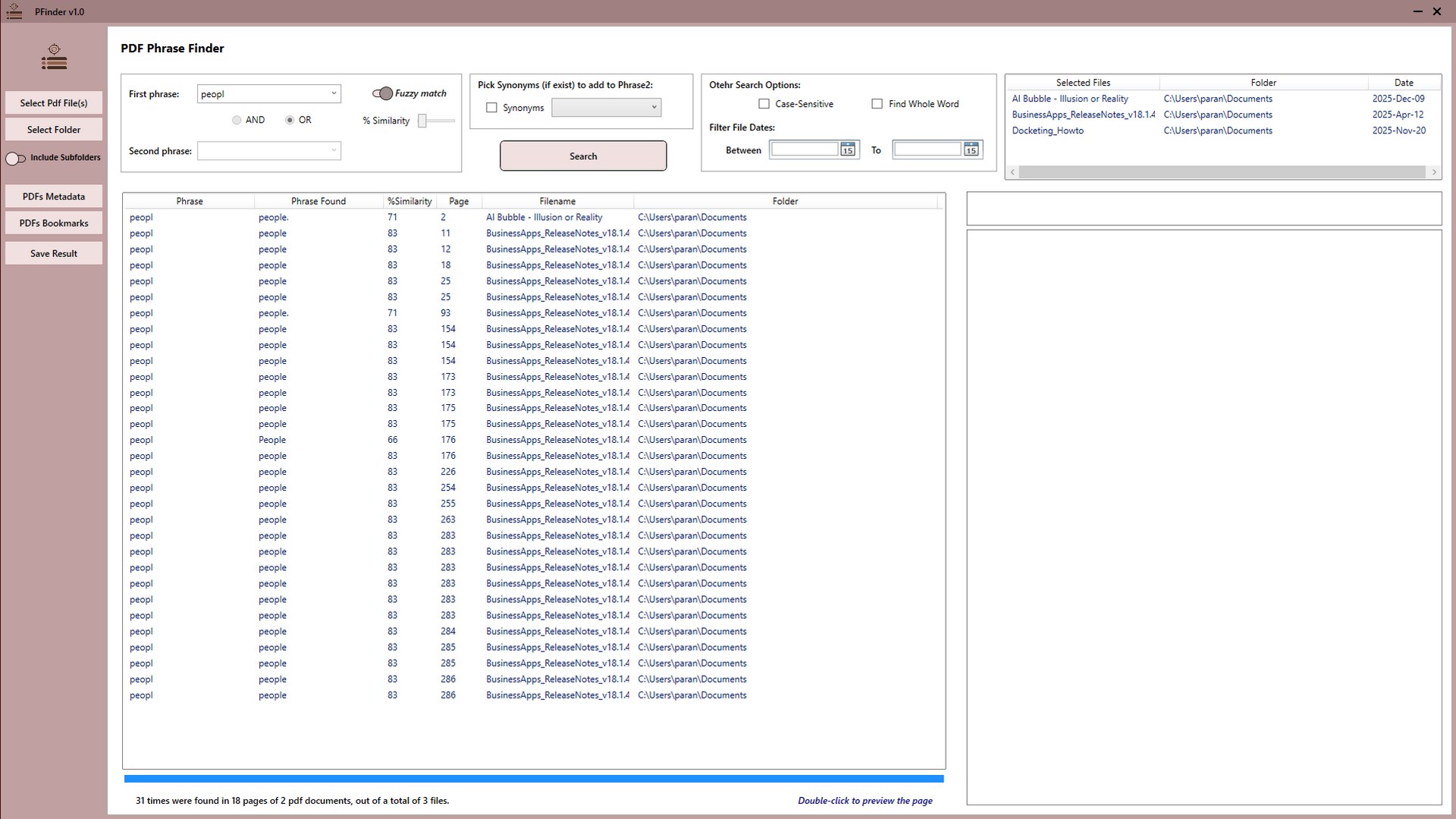
Searching for something you cannot spell exactly
The core technique is counter-intuitive: search less of the word, not more of it.
-
Write down the variants you already know
List the spellings you have seen — in correspondence, in the file name, in an earlier document. This tells you how much variation the set actually contains before you tune anything.
-
Search a short stable fragment, not the full name
Variation clusters at the start and end of names, so search the middle: 'hamm' rather than 'Mohammed'. A shorter fragment gives the search fewer characters to disagree about.
-
Enable fuzzy matching at a strict setting
Start with a small edit tolerance. This catches single typos and one-character transliteration differences without letting unrelated words in.
-
Loosen one step at a time
Increase the tolerance gradually and watch what appears. Stop as soon as clearly unrelated matches show up — that is one step past useful.
-
Use the second phrase to anchor the search
Combine the name with a distinctive second term using AND — a company, a place, a reference number — so a loose name search stays focused on relevant documents.
-
Export the results before narrowing further
Export the HTML report at the widest useful setting, so you have a record of everything the search surfaced before you started filtering it down.
Search the part that does not vary. Variation clusters at the beginnings and ends of names — prefixes, honorifics, suffixes, endings. The middle is usually stable. Searching "hamm" rather than "Mohammed" finds every variant at once, and the extra irrelevant hits cost seconds to scan past.
Choosing how fuzzy to be
Fuzziness is a trade, and both ends of it fail. Too strict and you are back to exact matching, missing the variants you enabled it for. Too loose and unrelated words start matching, burying the real hits in noise.
A workable habit is to start strict, look at the results, and loosen one step at a time until variants start appearing. Stop as soon as obviously unrelated matches show up — that is one step past the useful setting.
When it matters most
- Due diligence and background checks — where missing a mention is the entire failure mode.
- Disclosure and discovery review — documents written by many parties with no shared convention.
- Genealogy and archive research — historical spellings vary within a single family and a single document.
- Scanned and OCR’d collections — where the errors are the OCR engine’s rather than anybody’s.
- Invoice and reference lookups — where the number is right but the formatting is not.
For the review workflow around this, see searching a document production or disclosure set.
Get PFinder
Fuzzy search across a whole document set, for names that never appear the same way twice. Free.
Get PFinder free on the Microsoft StoreFree · no account, no sign-up · Windows 10 & 11
Frequently asked questions
How do I search PDFs for a name when I am not sure of the spelling?
Use fuzzy matching, which finds text close to your query rather than identical to it, measured by how many single-character edits separate the two. PFinder does this across a whole set of loaded PDFs, so Mohamed, Mohammed and Mohammad are all found from one search. Searching a short stable fragment of the name works better than the full spelling.
What is Levenshtein distance and why does it matter for searching?
It is the number of single-character insertions, deletions or substitutions needed to turn one string into another — a numeric measure of how different two spellings are. Fuzzy search uses it to decide what counts as a match, which is what lets a search for one spelling return the others, since most name variants are only one or two edits apart.
Why does exact search fail on names in document sets?
Because names vary for at least five independent reasons: transliteration from non-Latin scripts, typing errors, OCR misreadings such as rn for m, formatting differences like surname-first or initials only, and inconsistent reference formats. In a set written by many people over several years, all of them appear at once.
How fuzzy should my search be?
Start strict and loosen one step at a time. Too strict and you are back to exact matching; too loose and unrelated words match, burying the real results. Stop increasing tolerance as soon as clearly unrelated hits appear — that setting is one step past useful.
How do I find a name in scanned documents with OCR errors?
Fuzzy matching handles the characteristic OCR confusions — rn read as m, l as 1, 0 as O — because they are single-character differences. Note that this only works if the document was OCR'd at some point: a raw scan with no text layer contains no text to search at all, fuzzy or otherwise.
Can I combine a fuzzy name search with another term?
Yes, and it is the best way to keep a loose search focused. PFinder supports two phrases combined with AND or OR, so a fuzzy name search anchored to a distinctive second term — a company, a place, a reference number — returns relevant documents without the noise a wide name search alone produces.