How to Search Across Multiple PDF Files at Once
Ctrl+F searches one document. When the answer is somewhere in forty of them, the honest options are to open each in turn and search it — which nobody finishes — or to find a tool that treats the folder as the thing being searched.
This comes up constantly and has a poor set of default answers, because the obvious tools were each built for a different job.
Why the built-in routes disappoint
- Ctrl+F in a viewer searches the open document only, so the work scales linearly with the number of files and you have to remember which you have done.
- Windows Search can index PDF contents, but only if a PDF iFilter is installed and the folder is indexed — which is frequently not the case, so it silently returns nothing. That failure is common enough to deserve its own explanation.
- Acrobat’s advanced search genuinely does search folders, and does it well. It is also a subscription, which is why most people asking this question are not using it.
- Online search tools require uploading the documents, which rules them out for anything confidential.
Searching the set, not the file
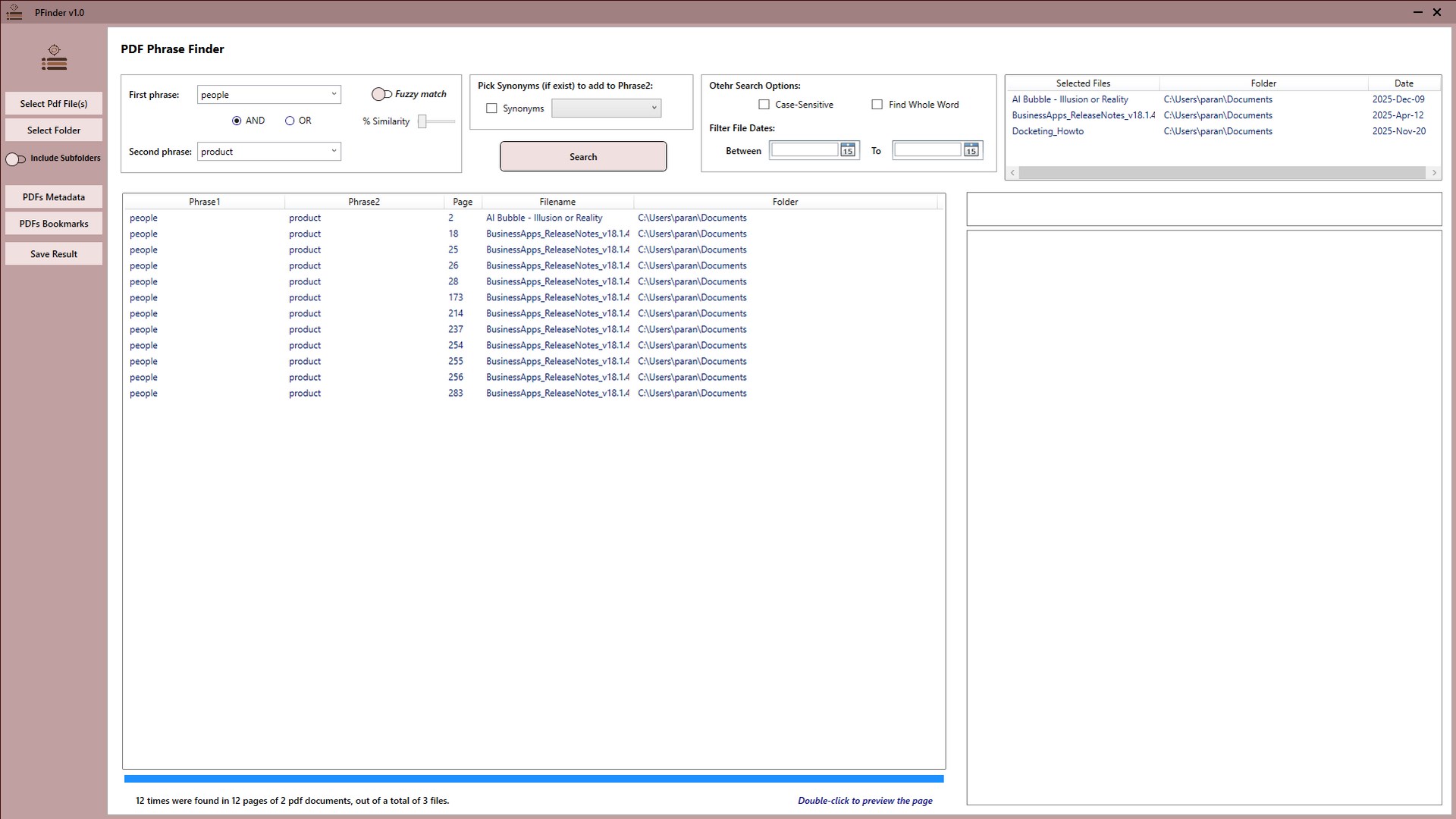
The tool for this loads many documents at once and treats them as one corpus. PFinder is a free Windows application that does this: point it at files or a whole folder, search a phrase, and get back every occurrence with the document it came from. Searches run on your own PC, and results can be exported as an HTML report.
Two capabilities beyond plain matching turn out to matter more than people expect, because exact search fails quietly. Fuzzy matching finds text a few characters different from what you typed — catching typos, OCR errors and spelling variants — and synonym expansion widens a search to conceptually related wording. Both exist because no results and not present look identical, and confusing the two is how documents get missed.
How to run the search
The technique that matters is starting broad and narrowing, rather than typing your best guess and trusting a zero-result answer.
-
Gather the documents into one folder
PFinder can load a whole folder at once, so putting everything in one place first means the search covers the complete set rather than whichever files you remembered.
-
Start with a short, distinctive phrase
Search two or three words rather than a full sentence. Long exact phrases fail on a single differing character, and a short distinctive fragment gives the search less to disagree with.
-
Turn on fuzzy matching if the first pass is thin
Fuzzy matching catches typos, OCR errors and spelling variants that exact search silently misses. It is the difference between 'not found' and 'not present'.
-
Add a second phrase to narrow or widen
Use AND when both terms must appear to make a match relevant, and OR when the same idea might be written either of two ways.
-
Review results by document
Work through the matches by file so you can see which documents are relevant overall, not just which contain a keyword. Concentration of hits is usually more informative than any single one.
-
Export the results as an HTML report
Export the findings so the search is recorded and can be shared or revisited — useful when someone later asks what you searched for and what came back.
Treat zero results as a question, not an answer. When a search returns nothing, the likeliest explanations are that the phrase is written differently in the documents, that the file is a scan with no text layer, or that your search was too specific. Shorten the phrase, enable fuzzy matching, and only then conclude the term is genuinely absent.
The one thing that cannot be searched
A scanned PDF with no text layer contains images of words, not words. No text search will find anything in it, and this is the single most common reason a phrase that is definitely in a document cannot be found.
The test takes two seconds: open the PDF and try to select a line of text with your cursor. If it highlights, the document is searchable. If nothing selects, it is a scan and needs OCR before any search tool — this one included — can read it.
After you have found it
Finding the passage is often step one. If the next job is pulling those pages out into their own document, or breaking a large bundle into its parts, that is PMarker Pro — see splitting a PDF by its bookmarks.
Get PFinder
Search a whole folder of PDFs in one pass, with fuzzy matching. Free on Windows.
Get PFinder free on the Microsoft StoreFree · no account, no sign-up · Windows 10 & 11
Frequently asked questions
How do I search for text across multiple PDF files at once?
Use a tool that loads the whole set and searches it as one corpus rather than opening files individually. PFinder is free on Windows: point it at a folder of PDFs, search a phrase, and it returns every occurrence with the document it came from. It also supports fuzzy matching for typos and variants, and exports results as an HTML report.
Can I search a folder of PDFs without opening each one?
Yes. Ctrl+F only searches the open document, but dedicated tools search a folder in one pass. Windows Search can do it if a PDF iFilter is installed and the folder is indexed, though that often is not the case, and Adobe Acrobat's advanced search handles folders but requires a subscription.
Why does my PDF search return no results when I know the text is there?
Three usual causes. The document may be a scan with no text layer, so there is no text to find. The phrase may be written differently from how you typed it. Or the search may be too long and specific, failing on a single differing character. Shorten the phrase and enable fuzzy matching before concluding the term is absent.
How do I know if a PDF is searchable?
Open it and try to select a line of text with your cursor. If the text highlights, there is a real text layer and it can be searched. If nothing selects, the page is an image and the document needs OCR before any search tool can read it.
Is there a free alternative to Adobe Acrobat for searching multiple PDFs?
PFinder is free on the Microsoft Store and covers multi-document search, Boolean AND/OR between two phrases, fuzzy matching and synonym expansion, with an HTML export of results. Acrobat's search is excellent but comes with a subscription, which is more than most people need to search a folder of documents.
Can I search PDFs without uploading them anywhere?
Yes — PFinder is a desktop application, so the documents are searched on the PC where they already are. This matters for legal, medical, financial and client files, where uploading to a web service may breach a confidentiality obligation regardless of the tool's own policies.